Select the "Begin" button to start.
Bryans' Amazing Animals Case
Instructions
The Bryans’ Amazing Animals activity has three parts. You can go to each part using the topic links provided on the main menu. Begin by reading the Overview. Then, in the Using CountThings section, learn about how to install and use the CountThings software to count sheep in the photo taken by a drone that accompanies the case. Finally, report your findings on the Summary of Findings page.

Innovation mindset case studies – Bryan’s Amazing Animals (modified)
© 2018 Ernst & Young Foundation (US). All Rights Reserved.
SCORE No. 03786-181US

Overview
You are an auditor tasked with verifying the inventory of Bryan’s Amazing Animals (BAA), the owner of a sheep farm. For BAA, the flock of sheep represents an important biological asset (that is, living plants and animals), and it is, therefore, important that the company maintains an accurate count of the inventory. Each year, BAA performs an inventory count as they move the sheep from their winter pasture to their summer pasture. The sheep are not easy to count in this process because there are large numbers of them, they continually move around, and they are hard to distinguish from one another.
BAA is interested in making the inventory count process more efficient and less stressful for the sheep. It is also interested in improving the accuracy of the inventory data, improving the timeliness of the reporting, and having the process documented in a better manner. BAA is especially interested in understanding if these technologies could be used by external auditors.
Traditional Counting Method
One of your emails about this project describes BAA’s current counting method.
Hi! I thought some info about our traditional method of counting would help you. We do what you would imagine: we have shepherds and dogs herd the sheep through a small gate. Two of my employees (the counters) count the animals as they pass through. New auditors who have not been on engagements at sheep farms are often amazed by this process. This video of the traditional method of counting sheep (4:33) will help you understand the process and see for yourself how challenging it can be.
In the video, you can see that the sheep are scared of this process and like to go through in groups. Each counter tries to be accurate and only count each sheep once; however, I think you’ll agree from attempting it with that video, this is a difficult task. This visual approach to counting the sheep required five people working for an hour to count the sheep in the video. Inventory counting is very time-consuming! I hope you can find a better way to do this.
Presentation
While reviewing BAA’s reports and information, your calendar reminds you it's time to head over to the conference room for a presentation about how EY, one of the Big Four public accounting firms, will explain how they are using drones to help drive the digital audit.
For BAA’s audit, one or more auditors would be required to perform the same task as the counters, adding even more labor to the traditional process. You wonder if innovations in technology could make the BAA inventory audit more efficient.
After the presentation, you return to your office. You decide to watch the video describing how EY is using drones for digital auditing.
The presentation explained the importance of considering regulatory and technical procedures when reimaging a new process for auditing inventory. You take the time to review the AS 2510: Auditing Inventories auditing procedures document available on the PCAOB website that was mentioned in the presentation
This concludes the Overview.
Innovation mindset case studies – Bryan’s Amazing Animals (modified)
© 2018 Ernst & Young Foundation (US). All Rights Reserved.
SCORE No. 03786-181US
Using CountThings
You have received an image of all of BAA’s sheep taken by a drone flown by a certified drone pilot. Therefore, you do not need to learn how to fly a drone because this work already has been completed for you. Download the photo of the BAA sheep taken by the drone for use with CountThings.
Watch a demonstration about how to use CountThings.
Install CountThings
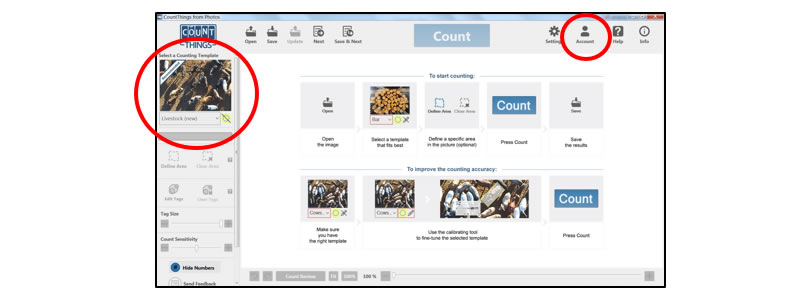
- Your instructor will give you the email address and password to access the CountThings ProPlan for free. (You cannot use the Free Plan, as you will have more than 10 sheep to count.)
- Go to CountThings and download the appropriate software for your device. The software will run on the following operating systems, Apple iOS (iPhone and iPad), Android OS (Phone and Tablets), and Windows Desktop PC OS. Currently, there is not a version of CountThings for Apple’s MacOS. Note: The menu item locations may differ slightly depending on what operating system you are using. Refer to the specific operating system CountThings from Photos app for further details.
Counting Sheep Using CountThings
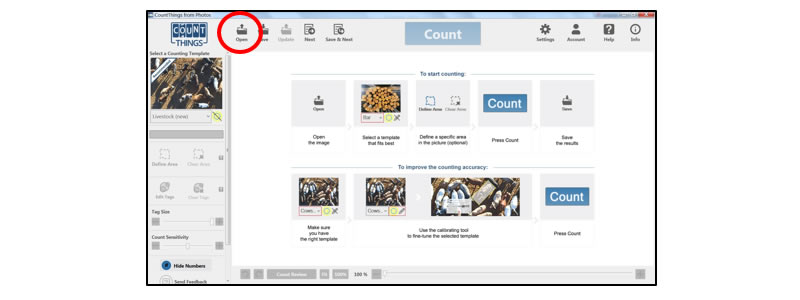
- Select the template for Livestock – sheep.
- Set the location for your saved images using the Settings button. Note that the default is that CountThings saves images in a separate folder by the count date.
- Open BAA’s inventory photo of the BAA sheep taken by the drone. You will need to save this image to your device that is running the CountThings application.
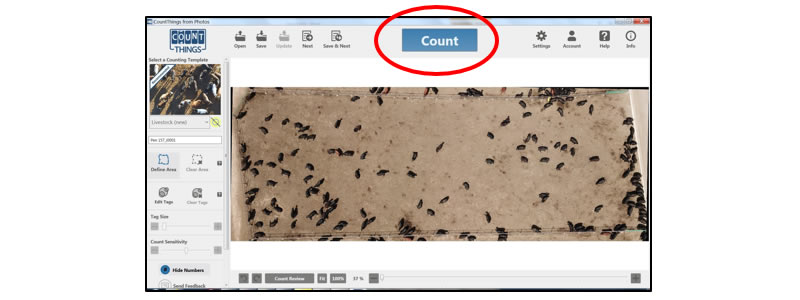
- Select Count.
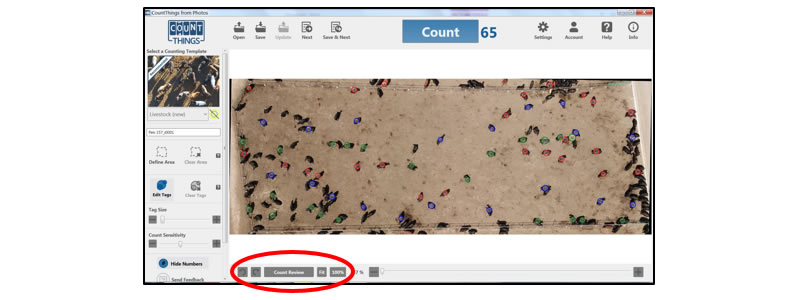
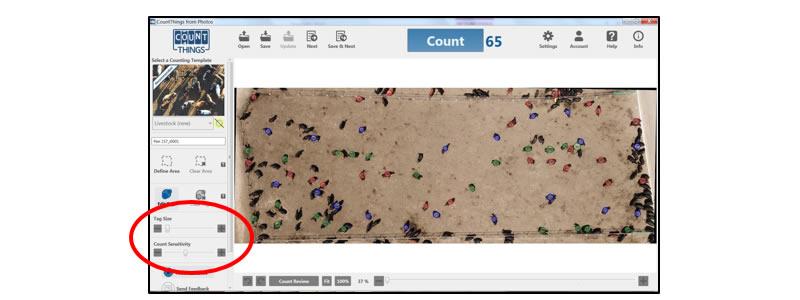
- Count the number of sheep in the image. Review the initial count produced by CountThings and adjust the tagging appropriately until you believe you have an accurate count.
- Note that while CountThings is an effective tool, variation in the colors of sheep, sagebrush, and other objects can often be flagged as sheep or not flagged. You need to make sure you carefully review the entire image so your count is as accurate as possible. Carefully evaluate the picture looking for sheep that are different colors or tightly packed together.
- The counted image shows each identified item with a circle and a number. Note that the colors of each circle do not have any meaning and are only used to help you differentiate between individual items. You can increase or decrease the count sensitivity using the scale. A higher count sensitivity would lead to more items being tagged. You can also increase or decrease the size of the tag using the scale. A smaller tag size can be helpful if you are counting many items that are close together.
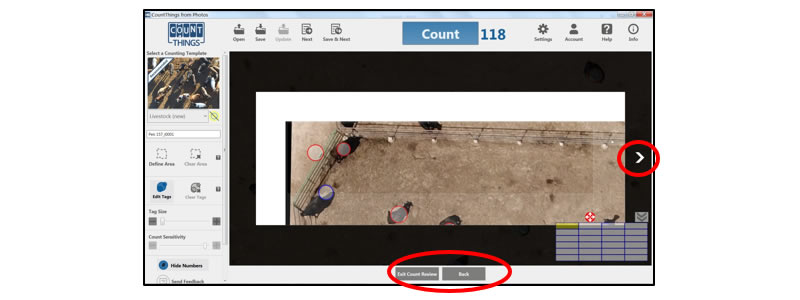
- You can manually tag or remove the tag from items that represent errors in the count performed by CountThings by selecting the individual items. If you’d like to get a closer look at each section of the image, select Count Review, to use a magnified version of each section of the image.
- You then can go through a magnified version of each section of the image. Proceed through each section using the arrows and select Exit Count Review when you’re finished with all of the sections.
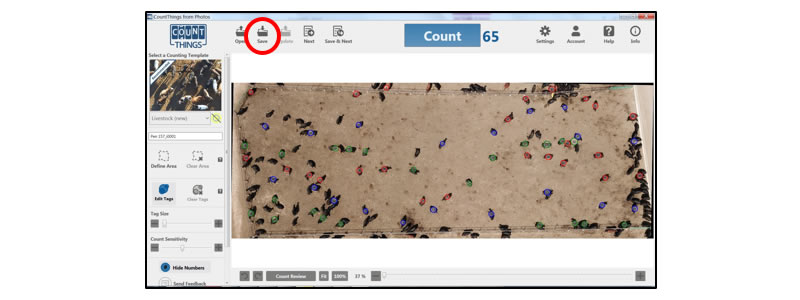
- After completing the count, select Save.
- CountThings will save your completed image to the location you set earlier.
BAA Inventory Report
Compare your results with CountThings to BAA’s Inventory Report:
- BAA reported that it sent 3,080 sheep to the winter pasture (these sheep arrived on a truck two months earlier and this count can be considered correct).
- While in the winter pasture, the shepherds found the carcasses of six sheep (likely killed by predators).
- 1 sheep was sick and could not make the trip to the summer pasture.
- Since they were down 7 over winter, they expected 3,073 sheep. But, it’s possible that other sheep wandered away or were killed by predators and the shepherds were unaware of their disappearance.
- The two in-person counters initially reported counting 3,081 sheep and 3,063 sheep, respectively.
- After deliberation, the counters agreed to make the final count 3,070 sheep.
- BAA management adjusted the accounting inventory records accordingly.
This concludes Using CountThings.
Innovation mindset case studies – Bryan’s Amazing Animals (modified)
© 2018 Ernst & Young Foundation (US). All Rights Reserved.
SCORE No. 03786-181US
Summary of Findings
Please answer the following questions. After you have provided answers to each question, you will need to save/print a file with your answers, and use these to complete the submission requirements for this assignment.
This concludes Summary of Findings.
Innovation mindset case studies – Bryan’s Amazing Animals (modified)
© 2018 Ernst & Young Foundation (US). All Rights Reserved.
SCORE No. 03786-181US